8bot
Scale AI Capacity
as a Service
Meet the
Managed AI Coworker
Employees hand off work in minutes. Pax8 8bot carries it forward. You deliver client capacity as a repeatable service with visibility, support and control.
8bot is currently Early Access.
Give Client Teams More Capacity
8bot moves everyday work forward so employees can stay focused on what needs their judgment.
Build Trust into Every Handoff
Approved connections, visibility and provider support keep oversight behind the work 8bot carries forward.
Scale AI as a Managed Service
Deploy, support and grow 8bot as a repeatable service across customers.
Put 8bot to Work as a Service You Deliver
Give Clients More Capacity and Build Recurring Revenue with Your Expertise Behind 8bot
From Scattered Tasks to Steady Progress
Notes here. A proposal there. A follow-up waiting. 8bot gathers the pieces so employees spend less time chasing details and more time moving forward. Your clients gain capacity. You gain an ongoing service to support and grow.
Set the Goal. Manage the Service.
Deliver 8bot through a platform you already know. Employees hand off a goal, and 8bot carries the work forward with context, approved connections and specialist agents when needed. They review the results. You manage the service with usage visibility, support and control.
See 8bot turn context into finished work clients can review and use. They gain capacity without adding headcount. You gain a managed AI service you can support, govern and grow.
Managed AI Work with Oversight Built In
8bot Moves Work Forward with 8os Safeguards, Employee Approval and Your Deployment, Oversight and Support.
Stay Close
to the Work
See user access and usage by client so you can oversee the service and support what comes next.
Stay Close
to the Work
See user access and usage by client so you can oversee the service and support what comes next.
Approval Stays with the Employee
8bot moves work forward with controls and guardrails that keep people in charge.
Context Stays Private
MSPs see service status, usage and spend, while user conversations and work stay private.
Turns AI Usage into Outcomes
8bot moves goals and repeat tasks into real work partners can support, grow and deliver as a managed service.
Works Across the Tools Employees Use
8bot uses approved tools like mail, calendar, Teams and files to move work forward.
Each 8bot Has Its Own Workspace
Every user’s 8bot runs on a dedicated cloud computer with its own browser, files and memory.
Manage the Service in One View
Pause, restart and troubleshoot coworkers, with usage and costs visible by client.
Security and Trust
Put AI to Work with Clear Boundaries
Bring customer AI into view with 8os and guide a responsible rollout. When you deploy 8bot, clear boundaries help people stay involved.
Customer-Level 8os Management
8bot App Access
8bot Protected Workspace
Keep With the Module
“The inversion from AI-as-tool to AI-as-operating layer changes the rhythm of work and is already visible in businesses furthest along the maturity curve.”
Get Ready for 8bot Access
8bot access begins in January 2027. Join the list now so you’re ready to build agentic AI services when it opens.
Thank you. A Pax8 cloud expert will be in touch soon.
Pax8 8bot FAQs
Common Questions About 8bot, the Managed AI Coworker for Small Businesses
What is 8bot, and what does one AI coworker seat include?
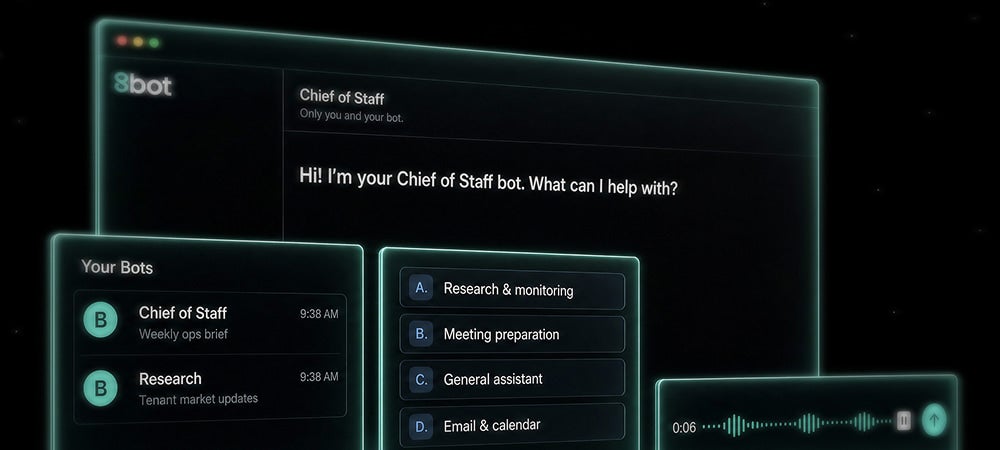
8bot is a managed AI coworker. Each seat is one always-on AI worker for one person, running on its own dedicated computer in the cloud. With your consent it connects to your Microsoft 365 mail, calendar, Teams and files. From there it briefs you, sends alerts, runs routines, completes tasks on its computer and brings in specialist bots when the work needs them.
How is 8bot different from an AI assistant, chatbot or AI agent coworker?
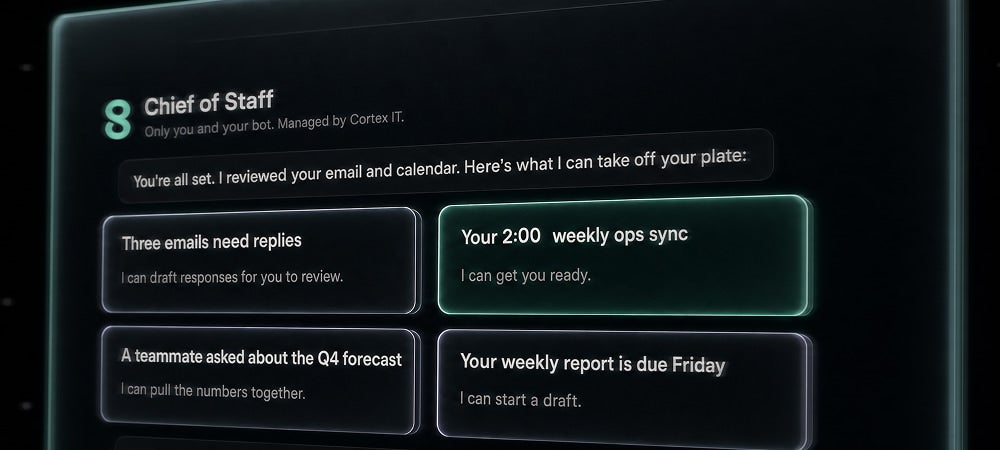
An assistant waits to be asked and forgets what happened last week. 8bot keeps working between the asks as a persistent AI digital worker. It watches what is stalling, surfaces what needs a decision and carries the next step forward. The practical difference is compounding: skills expand, context deepens and memory grows, so each week of work makes the next one better instead of starting the same conversation over. A person still decides what matters and stays accountable for the outcome.
What can employees hand off to this AI coworker?
Start with the work between bigger priorities: preparing for meetings, researching a prospect, drafting follow-ups and summarizing what changed in mail and Teams. Anything you ask for regularly becomes a routine with a name and a schedule. 8bot also comes with Pax8-built skills that stay off until you turn them on, each showing what it does and where it will ask for approval. You hand off the task to a managed AI coworker and get back work you can review, edit, send or act on.
What does it mean that this AI digital worker has its own computer?
Each user’s AI digital worker runs on a dedicated cloud computer with its own browser, files and memory, which it keeps between tasks. Nothing runs on your device, and no two users ever share a computer. Because it has a browser, 8bot can also work in tools that don’t offer an API.
How is 8bot different from Microsoft 365 Copilot or other AI for small businesses?
An assistant waits to be asked. 8bot keeps working between the asks. Copilot is built into Microsoft apps and set up for each organization. 8bot is a proactive managed AI coworker with its own computer that acts on schedules and triggers, works across your tools, including sites with no API, and is deployed and supported by your MSP. It works alongside Microsoft 365, and Microsoft 365 is the first set of apps it connects to.
Which apps does this managed AI coworker connect to?
At beta, 8bot connects to Microsoft 365: Outlook mail, Calendar, Slack, Teams and OneDrive and SharePoint. This managed AI can read and, with your permission, write, and every write needs your approval. More connectors are planned for general availability, including Google Calendar and Google Drive, QuickBooks and Xero, and custom connections your MSP approves.
Will this AI worker send email or take action on its own?
Not by default. Connections start read-only. Sending an email, changing a meeting, posting in Teams or editing a file needs a separate permission that you turn on for each app, and every one of those actions still asks for your approval. Approvals are checked where the action actually happens, so a bad instruction can’t get around them.
Can providers sell 8bot as a managed AI service?
Yes. 8bot is designed as AI automation for MSPs: your own branded, managed and billable service rather than another vendor-owned experience. You deploy it, govern it, support it and bill it through the Pax8 relationship you already own. That is what turns AI from a referral into a managed AI service line with recurring revenue attached to it.
How do I get started with an AI coworker?
Sign in with the Microsoft work account you already have. 8bot doesn’t create new passwords for you, and you accept the terms before your bot is created. Setup is a short conversation: 8bot asks what you need help with, connects your apps in the chat and sets up your first routine. It’s designed to deliver value within minutes, with no partner help required. New capabilities are offered one at a time, and you choose which to turn on.
How is my data kept private and secure with a managed AI coworker?
Your conversations are visible only to you and your bot. The MSP that deployed your seat sees deployment status, usage and spend, but not your content. Pax8 support can access your AI coworker’s activity record to resolve issues, with passwords and secrets hidden. Your bot runs on its own isolated computer, and during the beta your data is hosted in the U.S.
Does an AI coworker replace employees?
No. AI coworkers do not replace employees; they are tools that help people move more work forward. Judgment, creativity, leadership, expertise and accountability still sit with the person. People decide what matters, set the rules and answer for the outcome. What changes is that more of the work between intent and outcome can be handed to 8bot. For small businesses, AI is not about replacing people. It is about adding capacity when headcount cannot grow every time the work does.
Does 8bot work inside a protected environment?
Yes. Every 8bot runs on its own dedicated cloud computer rather than on a shared device. Each AI coworker maintains its own workspace, browser and memory, helping keep work isolated while giving people visibility into what the managed coworker is doing and producing.
Who stays responsible for decisions made with 8bot?
People do. 8bot helps complete tasks, surface information and move work forward, but employees remain responsible for reviewing outputs, making decisions and approving actions. AI coworkers increase capacity, while accountability stays with the people using them.
Can providers manage 8bot deployments across customers from one place?
Yes. Through 8os, providers can view AI coworker deployments, usage and spend across the businesses they support. This helps create visibility into adoption while keeping each customer’s AI workforce separate and independently managed.
How do I control what 8bot can access?
Access is managed at both the provider and end-user levels. Providers set the available applications and access policies, while end users approve individual connections and permissions for their 8bot. Access can be extended later as needs evolve.