A SPACE STATION JOURNEY THAT PROPELS SECURITY FORWARD
SALUS
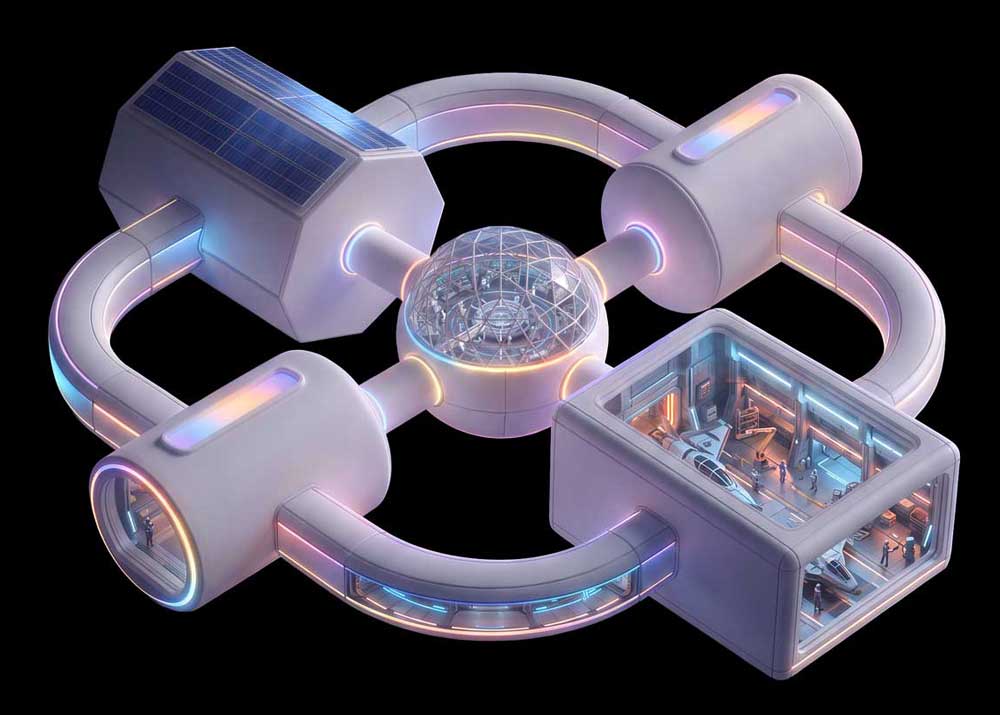
SPACE STATION
EXPLORE ROOMS DISCOVER OBJECTS GAIN CLEARANCE
______ Where MSP growth takes flight
See clearly
Govern confidently
Secure consistently
Prove progress
SALUS Shows You How
Discover how repeatable security practices reduce complexity, strengthen resilience, and cast security gaps into the void of space.
Your mission:
Build security
that scales
- Reduce complexity
- Strengthen security foundations
- Govern AI
- Measure progress
- Turn gaps into growth
- Secure the future
You are now entering
TERMINAL
01
Command and Operations
Every mission needs a command center. This is where the space crew map their environment, set security goals and get a clear view of what they’re protecting. Know what you have, where it lives and what’s changing. With visibility established, your crew can reduce complexity, take control and operate from one coordinated security plan.
TERMINAL 1 – ROOM 1
Mission
Control
Mission Control gives your crew a clear view of the devices, identities, connections and activity across your environment. With the right signals in one place, the crew can spot gaps, track risk and measure progress before small issues become mission-critical.
ENTRY 01.1
Title one
The Holographic Station Map gives you a live 3D view of SALUS, from flight computers and star trackers to hatch controls, fuel sensors and power levels, to prevent your crew from flying blind.
- CIS 1: Asset Inventory and visibility
- NIS2 | 12: Asset Management
- Essential Eight: Asset Visibility
TERMINAL
02
Permissions and Training
Humans, robots and AI agents may all have jobs aboard SALUS, but that doesn’t mean everyone gets access to the command deck.
The Permissions and Training terminal puts the right permissions, oversight and training in place so automation can move fast without leaving security behind.
The crew knows who can access what, when and why, ensuring all staff know how to handle the appropriate controls for their roles.

ENTRY 02.1
Title one
The Holographic Station Map gives you a live 3D view of SALUS, from flight computers and star trackers to hatch controls, fuel sensors and power levels, to prevent your crew from flying blind.
- CIS 1: Asset Inventory and visibility
- NIS2 | 12: Asset Management
- Essential Eight: Asset Visibility
TERMINAL 2 – ROOM 1
Permissions
Pod
Mission Control gives your crew a clear view of the devices, identities, connections and activity across your environment. With the right signals in one place, the crew can spot gaps, track risk and measure progress before small issues become mission-critical.
TERMINAL
03
Engineering and Maintenance
TERMINAL 3 – ROOM 1
Engineering
Bay
ENTRY 03.1
Title one
The Holographic Station Map gives you a live 3D view of SALUS, from flight computers and star trackers to hatch controls, fuel sensors and power levels, to prevent your crew from flying blind.
- CIS 1: Asset Inventory and visibility
- NIS2 | 12: Asset Management
- Essential Eight: Asset Visibility
TERMINAL
04
Crew Habitat
The Crew Habitat is the heart of SALUS, where the team can recharge, regroup and stay protected. Here, identities are verified, personal data is safeguarded and recovery plans are always within reach. It’s the terminal that strengthens identity controls, maintains staff safety, secures data and keeps your mission resilient and restorable. Technology powers the vessel, but people keep it going.
ENTRY 04.1
Title one
The Holographic Station Map gives you a live 3D view of SALUS, from flight computers and star trackers to hatch controls, fuel sensors and power levels, to prevent your crew from flying blind.
- CIS 1: Asset Inventory and visibility
- NIS2 | 12: Asset Management
- Essential Eight: Asset Visibility
TERMINAL 4
Living
Quarters
Duis aute irure dolor in reprehenderit in voluptate velit esse cillum dolore eu fugiat nulla pariatur. Excepteur sint occaecat cupidatat non proident, sunt in culpa qui officia deserunt mollit anim id est laborum.