
Microsoft is continuously updating Copilot to provide better AI productivity to SMBs. After months in preview for Microsoft’s Frontier partners, Copilot Cowork is now available globally.
In this post we’ll cover what Copilot Cowork is, how it’s different from the Microsoft 365 Copilot your SMB customers already know, as well as cover pricing options and licensing requirements.
What Is Copilot Cowork?
Copilot Cowork is an agentic system that plans, executes, and delivers real work outputs. Instead of responding to a single prompt, Cowork let’s you delegate job functions to an AI teammate that breaks tasks into steps, using multiple tools and producing finished output while you stay in control.
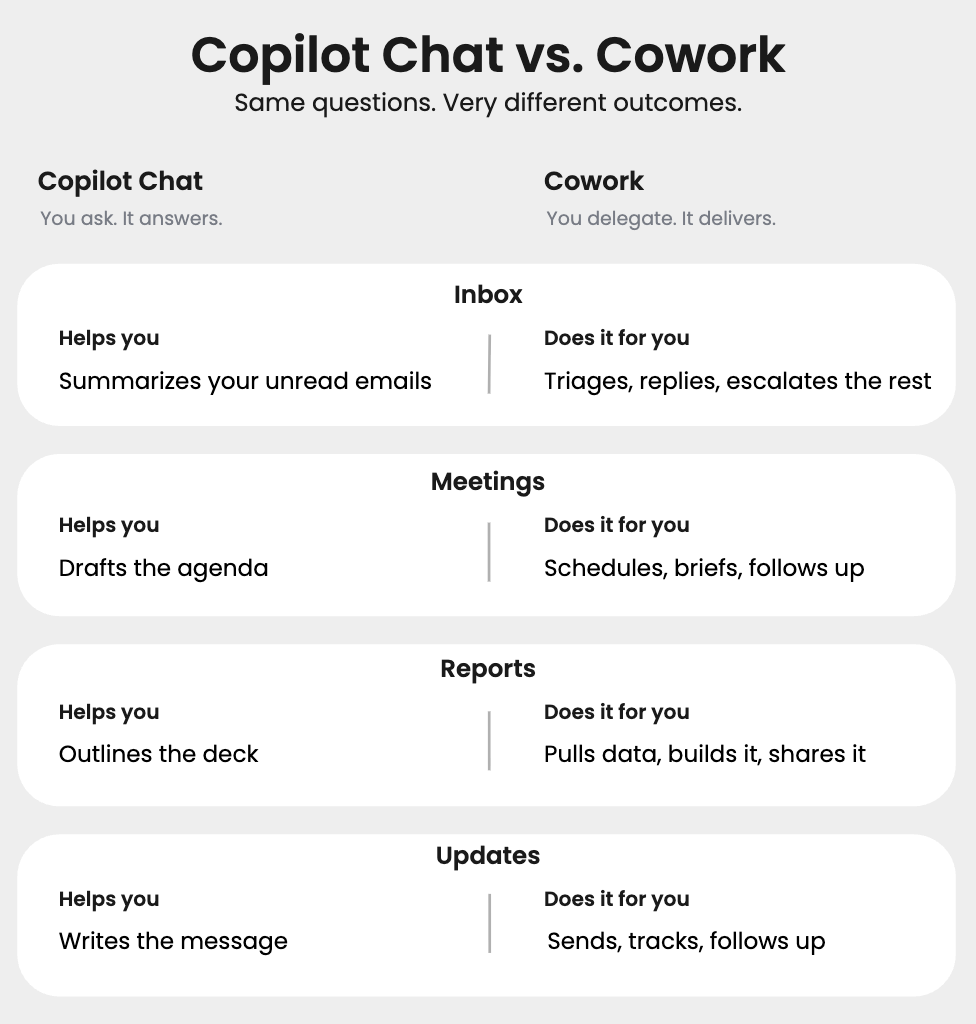
Your SMB customers are already familiar with Microsoft 365 Copilot which includes Copilot Chat, Copilot in the Office apps, pre-built agents like Researcher and Analyst, Work IQ, and model choice. It’s a strong AI assistant to brainstorm ideas, drafting, or catching up on emails and meetings, creating and editing documents, as well as running deep research and analysis through pre-built agents.
Cowork takes that a step further. Microsoft 365 Copilot shines as an assistant for single, in-the-moment tasks, while Cowork is built to produce multiple artifacts in a single job and to run a business process across multiple systems. Think of it as the move from “help me write this” to “go do this whole thing for me.”
Cowork Pricing and How to Set It Up
Copilot Cowork is billed on a usage-based pricing model, in which customers pay for the work Cowork performs rather than per seat. There are two ways to purchase and provide flexibility for customers’ needs.
| Pay-as-you-go | Prepaid Copilot Credits | |
|---|---|---|
| Offer Name | Copilot Credits Pay-as-you-go | Copilot Credits Pre-Purchase Plan |
| Ideal For | Flexibility to scale up or down | Predictable usage |
| Cost | $0.01 | Lowest pre-credit cost |
| Usage term | N/A | Annual |
This Excel sheet helps model pricing to choose what will work best for your customers.
To set up Cowork, you need to ensure your customer has an Azure Plan configured through Pax8 so you can leverage an existing Azure subscription billed through Pax8. If your customer does not have an Azure Plan, please check out the Azure Plan $0 SKU in the Pax8 Marketplace and then create an Azure subscription.
- The Customer’s Global Admin can then configure Cowork’s usage-based PAYG billing in Microsoft Admin Center (MAC). Connect the Azure subscription and configure controls, limits, etc. directly within the MAC.
- For Cowork P3 Pre-Purchase Plan, the Customer Global Admin can enable the Cowork Azure Reservation Resource on a Pax8 Azure Plan Subscription in the Azure Portal.
For detailed instructions on how to set up Cowork, please consult our guide.
Please note: You need a Microsoft 365 Copilot Business or Microsoft 365 Copilot license to then utilize Cowork.
How Your Customers Access Cowork in M365 Copilot
Follow these steps to find and add Cowork for the first time:1. Open Microsoft 365 Copilot
- Go to copilot.microsoft.com in your web browser or open the Copilot app on your device.
2. Select the “Work” experience
- When prompted, choose Work to access your Microsoft 365 environment and company data.
3. Open the navigation menu
- In the top-left corner, click the Copilot logo (or menu icon) to expand the full navigation panel.
4. Navigate to Agents
In the left-hand navigation, locate the Agents section.
This is where all available Copilot agents are listed.
5. Check if Cowork is already available
Look through the list of agents for Cowork.
If you see it, click on it to open and start using it.
6. If Cowork is not listed, open the Agent Store
- Click “All Agents” to open the Agent Store, where you can browse and install new agents.
7. Search for Cowork
- In the search bar, type “Cowork” and press enter.
8. Add Cowork to your workspace
Select Cowork from the results.
Click “Add” to install it.
9. Access Cowork anytime
- After adding, Cowork will appear in your Agents list on the left-hand side.
- Click on it at any time to open and start a task.
What If You’re a Frontier Partner Using Cowork?
For those utilizing Cowork today through Frontier, you will have access to Cowork until June 30th before you need to set up a billing plan. To see who is on Frontier, the ASPX dashboard will provide insight. This will be available on June 20th. Learn more about the value ASPX provides here.
Why Does Cowork Matter for Pax8 Partners?
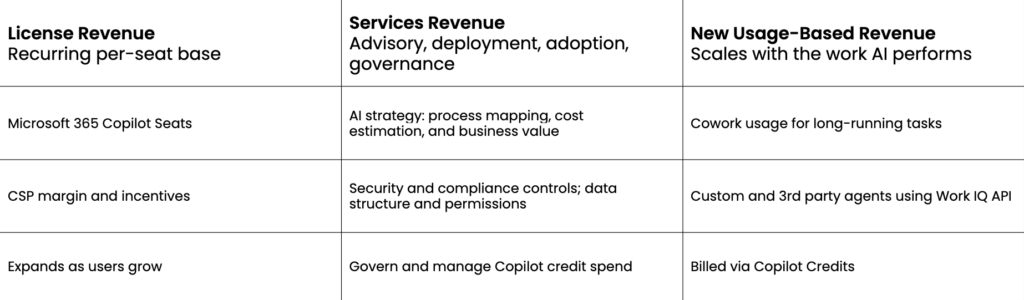
Cowork provides a new usage-based revenue stream for MSPs and managed intelligent providers (MIPs), enabling customers to automate multi-step workflows and deliver higher-value services, expanding the value AI provides.
Key Dates:
- June 16: Cowork GA and start of 14-day Frontier grace period
- June 20: ASPX Frontier targeting goes live (identifies Frontier tenants)
- June 30: Final day of grace period; all Cowork users must be set up for usage-based billing
- July 1: Usage-based billing required to continue using Cowork
Please note: Cowork requires an existing Microsoft 365 Copilot Business license or Microsoft 365 Copilot license. Your current Copilot customers are ready to activate Cowork today. For customers without a paid Copilot license, Cowork is one more reason to start the conversation. Get Microsoft M365 Copilot today in the Pax8 Marketplace to access Copilot Cowork.
Get Started Now
Microsoft 365 Copilot Cowork is the next step in SMB AI transformation, and a new way for Pax8 partners to grow alongside their customers. If you’re ready to activate Cowork for your customers or need help navigating setup, our team can walk you through it.